Each email you log in opens an entry in the register, with its own number running in sequence each year — E/2026/14, the fourteenth incoming item of 2026 — its correspondent, its date and its documents saved in the matter.
For now the register records incoming items that arrive by email.
Opening the register
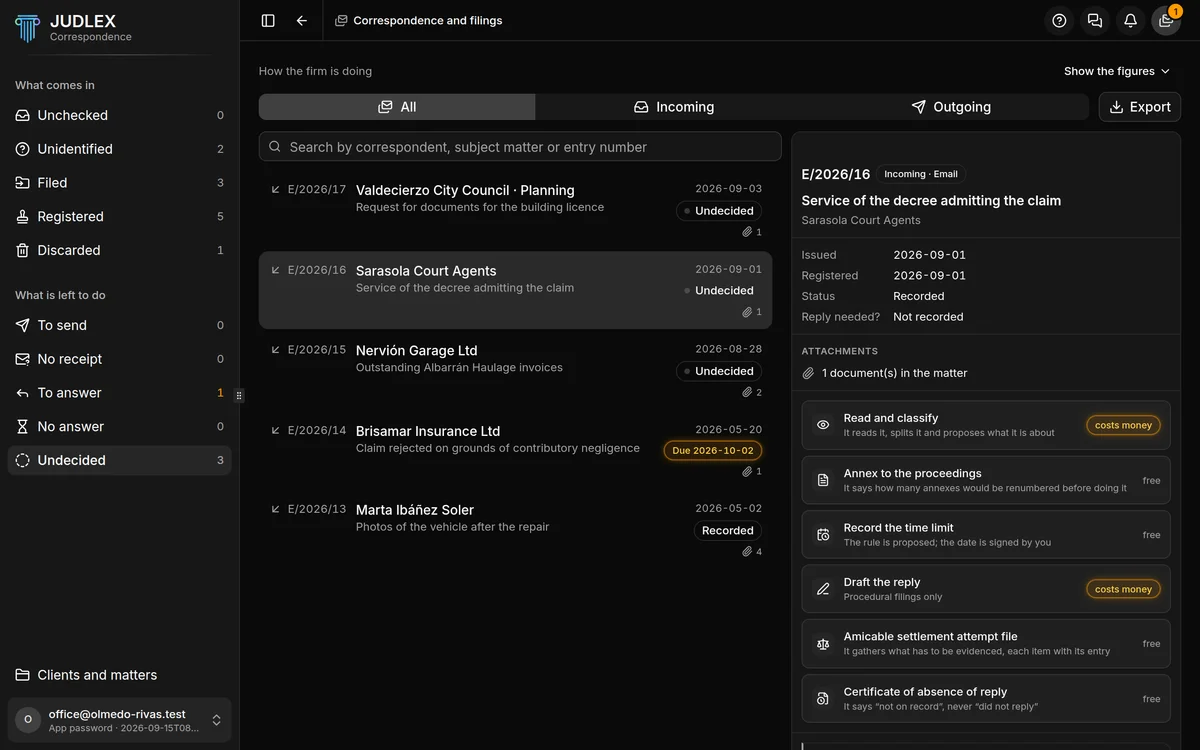
In the Correspondence side menu, the What is left to do group counts the entries that need something: To answer, No answer, Undecided… Clicking any of its rows opens the register, with all the entries.
The figures
At the top, How the firm is doing summarises the register:
To answer: something came in that needs an answer. In amber if there are any.
No answer: the expected date has passed.
Undecided: nobody has said yet whether it needs an answer.
Eight weeks: what has come in and gone out each week.
Collapse folds the figures away to make more room; they fold away on their own when you open an entry. Show the figures opens them again.
The list
Below All, Incoming and Outgoing, the search box finds entries by correspondent, subject matter or entry number.
Each entry shows its number, its correspondent, its subject matter, its date, how many documents it has and its status: Undecided, Recorded or, if it has a waiting date, Due… in amber.
The open entry
Click an entry and it opens on the right, without covering the list:
The number, Incoming · Email and the subject matter.
Issued and Registered, the two dates.
Reply needed?: Yes, No or Not recorded. “Not recorded” does not mean no: it means nobody has decided.
Waiting until, if it has a date, and who set it: typed in by hand or taken from a signed calculation sheet.
Attachments: how many documents it came with, which are saved in the matter.
Below are the entry's actions, each showing free or costs money: What to do with an entry.
At the foot, a reminder: sent is not delivered. JUDLEX keeps receipts issued by others, such as the postal service or a trust service provider, but issues none of its own.
Exporting the whole register
Export, to the right of All / Incoming / Outgoing, saves the complete register, untrimmed, in the folder you choose. It is a document that opens in your browser and can be printed.
It covers the entries on this computer. The register is not synced between computers.
From the client's record
On the client's record, each matter's menu has What has come in and gone out…, which shows that matter's entries, for viewing only.