Everything in JUDLEX starts with the client. This section explains how to add a client, how their paperwork is stored and how it is organised before it becomes a case file.
The usual order
The client is the person or company you work for.
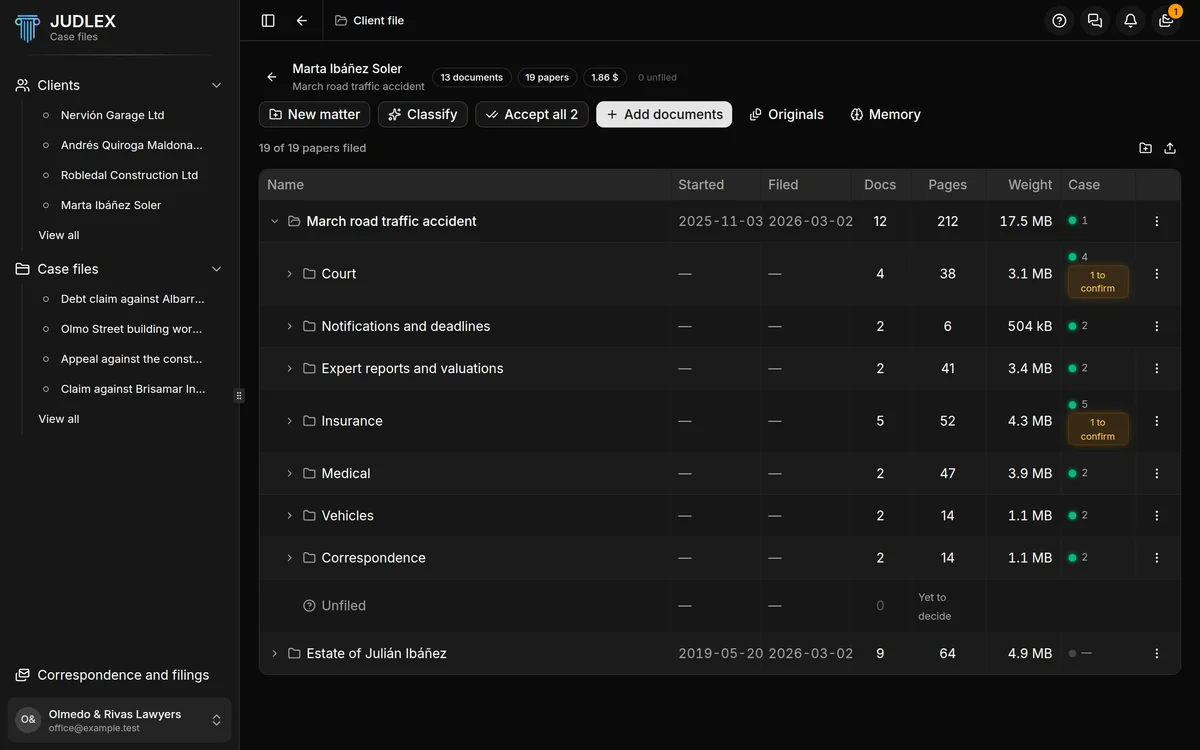
The matter is all the paperwork for one thing the client has brought you, exactly as they gave it to you: an inheritance, a divorce, an accident. A client can have several matters.
The case file is the proceeding built on top of a matter. It takes the matter's papers as exhibits, numbers them and foliates them.
The matter does not disappear when you create the case file. It remains the client's source folder, and more than one proceeding can come out of it: the same paper can be exhibit A.7 in a civil action and A.2 in an appeal, without there being more than one file.
Where you work on the paper
The screen where you work on the paperwork is the client file. That is where the client's matters are, each with its folder tree. You drag the papers in, JUDLEX copies them into its vault, splits them into the documents they contained and puts each one in its folder. You review what it has filed and correct whatever needs correcting.
Document and paper
JUDLEX distinguishes between two things that are best not confused:
A document is the file exactly as it came in. An eight-hundred-page PDF someone sent you is one document.
A paper is each real document that was inside it, now separated into its own PDF. That eight-hundred-page dump can be forty papers.
In the case file, each paper becomes an exhibit, with its code.
In this section
The client list: the main screen and what you can do from it.
The client file: a tour of the paperwork screen.
Matters: creating them, describing them, archiving them.