The month, in Your space, puts every date in the firm on one calendar: case file dates, client dates and recurring obligations.
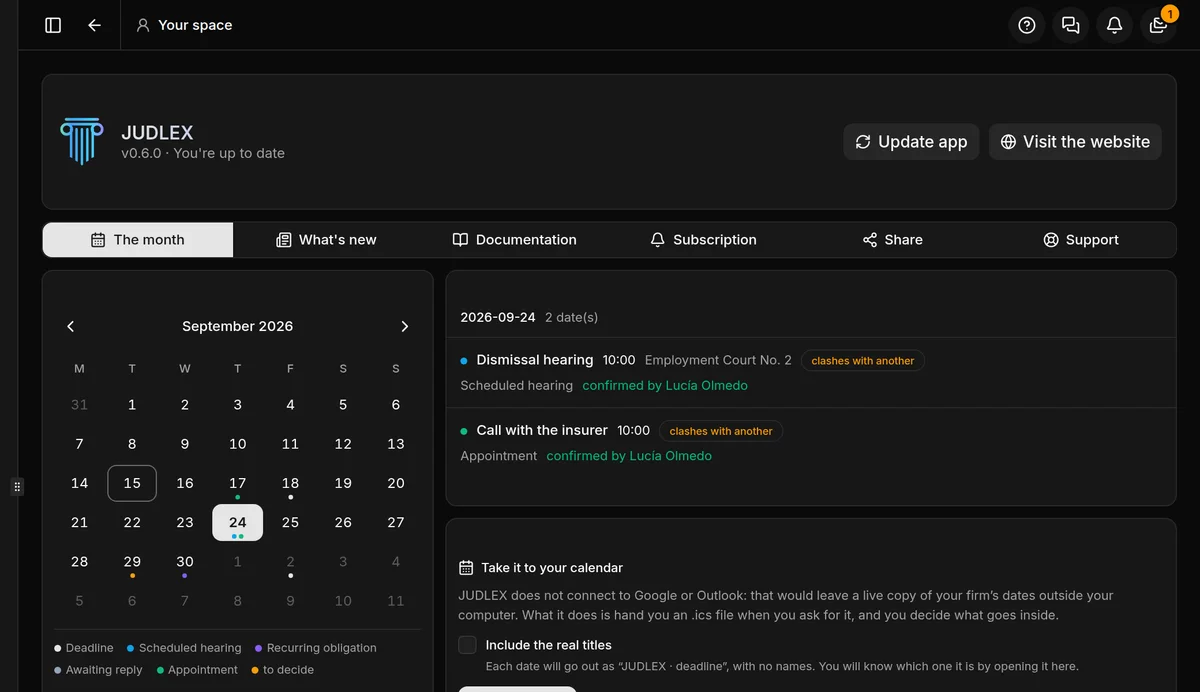
The calendar
Each day with dates shows one coloured dot per date, depending on what it is:
Deadline, Scheduled hearing, Recurring obligation, Awaiting reply and Appointment, each with its own colour.
In amber, to decide: dates that came out of the documents and that nobody has confirmed yet.
The arrows change the month. Today has a box around it.
A day
Click a day and its dates appear on the right: the title, the time and place if there are any, what kind of date it is and who confirmed it. If the date comes from a document, it shows the sentence from the document, the exhibit and the folio.
If two dates fall at the same time, both carry the label clashes with another.
Dates are decided, confirmed and counted in each case file, not here: Case file status. Dates for a client with no case file live in their recurring obligations: Recurring obligations.
Taking it to your calendar
JUDLEX does not connect to Google, Outlook or any other calendar. Instead, when you ask for it, it prepares a calendar file that you can open or import into the calendar you use.
Decide whether to include the titles
Include the real titles is off by default: each date goes out as “JUDLEX · deadline”, with no names, and you will know which one it is by opening it here. If you turn it on, the client’s name and the matter will go to whichever calendar you choose and may show up, for example, on your phone’s lock screen.
Click Save the .ics
Choose where to save it. Only confirmed dates are included.
Open it in your calendar
Import the file into your usual calendar. If the dates change later, save it again and import it again.