Conversations are saved automatically as you ask, with their answers, their citations and the documents they carried. You can close the panel, switch case file or start again without losing them.
Opening the history
Click the clock button in the panel header.
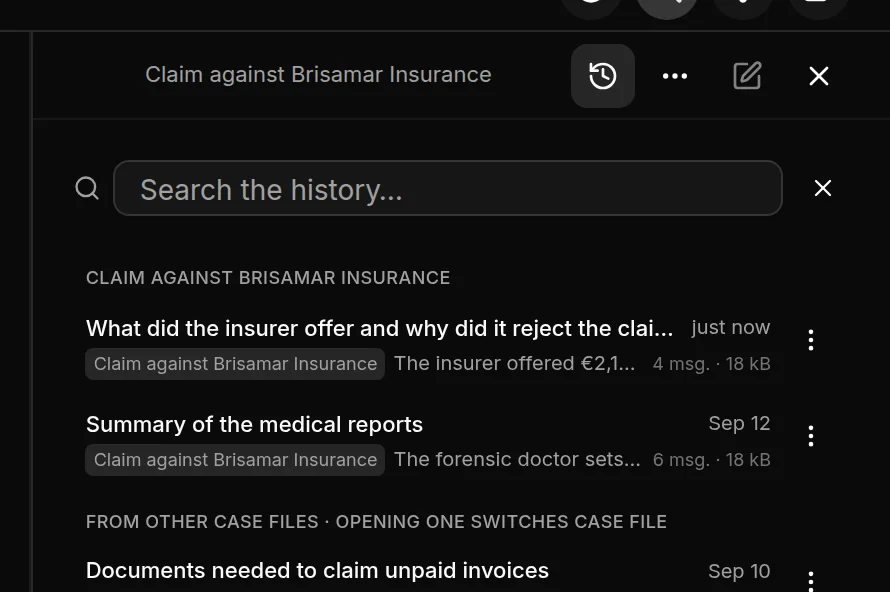
At the top are the conversations for the case file you have open, or those under General question if none is open. Below are those From other case files. Opening one of them also opens its case file.
For each conversation you see the title, the case file, the start of the last answer, how many messages it has, how much space it takes up and when it took place. If its case file has been deleted, it says so: no longer there.
Search the history… filters by title, case file or the start of the last answer.
Renaming and deleting
In each conversation's three-dot menu:
Rename: JUDLEX sets the title from the first question; here you can give it a different one.
Delete this conversation: asks you to confirm. Click again, this time on Yes, delete it, and it is deleted.
Deleting a case file also deletes its conversations: Archive and delete.
Where they are kept
Conversations are kept on this computer, in the JUDLEX data folder, not in the vault: they are not papers in the matter and cannot be cited. Open the history folder, at the bottom of the history, opens it.
What is kept on the computer is the copy of the conversation. Each question, when you asked it, was sent to the artificial intelligence provider: The consultation panel.