For JUDLEX to read the papers in a case file, it needs a key from an artificial intelligence provider. The key is like the key to an account you open with the provider yourself: JUDLEX uses it to send the provider the pages so it can read them.
Why the key belongs to your firm
The account is yours. You open it with the provider of your choice, with your own card, and the provider bills you for the reading directly, at its price and on its invoice.
JUDLEX charges no margin and takes no part in that payment. The only thing you pay us for is the licence.
What is read goes straight from your computer to the provider. It does not go through any server of ours.
The key is stored on your computer, in a file belonging to your firm, and it does not travel to any server of ours.
Without a key, JUDLEX still sorts, numbers and foliates just the same, because that is arithmetic and needs nobody. What it cannot do is read a paper.
Which providers it supports
Anthropic (Claude), OpenAI (ChatGPT), Google (Gemini), xAI (Grok), DeepSeek and MiniMax. You can have keys for several at once and choose which one is used at any time; for example, a powerful model for difficult case files and a cheaper one for volume.
Where to add it
In your account menu, at the very bottom of the sidebar, open Settings → AI and connections. At the top is the Your AI keys section, with one card per provider.
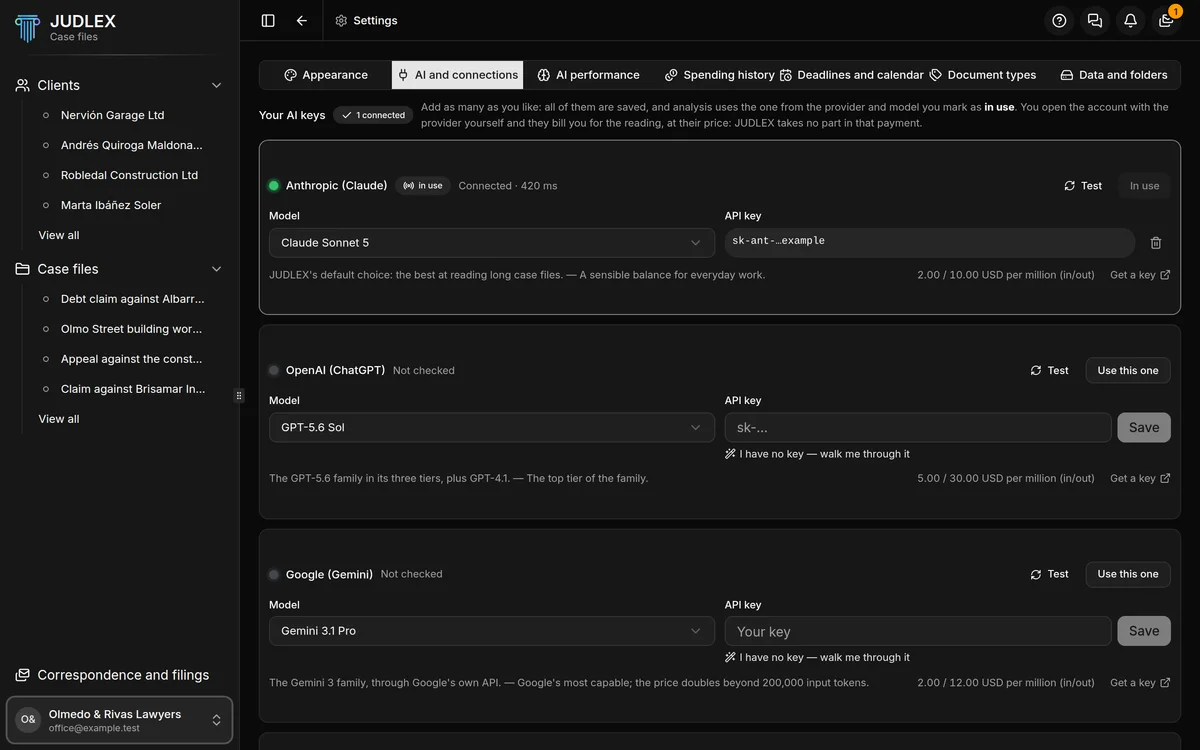
If you already have the key, paste it into Your key and click Save. If you do not, click I have no key — walk me through it on the card of the provider you prefer and follow the assistant.
The assistant, step by step
The assistant has six steps. You can go back at any time with Back.
What a key is
The first step explains the same thing as this article: that the account is yours and that the provider bills you for the reading. It warns you that it will take a few minutes and that you only have to do it once.
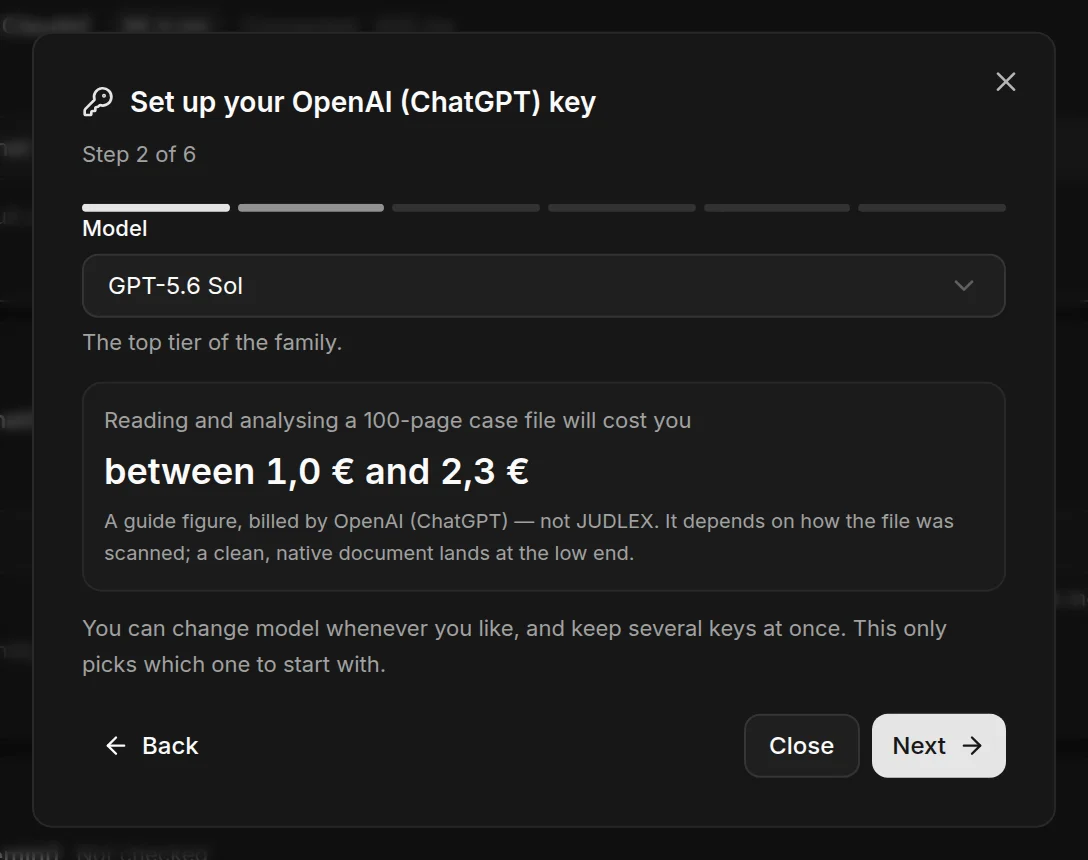
Choose the model and see what it costs
Choose the model you want to start with. Below it you will see roughly what it would cost to read and analyse a case file of a hundred folios with that model. The real price depends on how it was scanned: a document with clean text comes in at the lower end. You can change model whenever you like.
Open the provider s page
Click Open the … page, which carries the provider's name, and the page opens in your browser. There:
Create an account, or sign in if you already have one.
Add a payment method. Almost all of them ask for a card before letting you use their service, even if they charge nothing up front.
Look for the button to create a key (it usually says "Create key" or "API key") and copy it.
Copy it as soon as it appears: almost all of them show it only once.
Paste the key
Paste the key into Your key. With the eye icon you can see it to check it. If it does not start the way that provider's keys usually start, JUDLEX warns you, but lets you carry on: the test in the next step is what counts.
Test it
Click Test the key. JUDLEX asks the provider for a minimal response using that key, which is the only way to know it really works. It will cost you a fraction of a cent, billed by your provider.
If something fails, you can Paste it again, Pick another model or Test again, and see what the provider replied to find out what is wrong.
Done
Click Save and get started. The key is stored on your computer and JUDLEX will use it with the model you chose.
Several keys, and which one is in use
Each provider card has:
Model, to choose which one you work with.
Use this one, to make it the provider JUDLEX uses. The active one says In use.
Test, to check that the key and the model still work. With most providers it costs nothing; with those that do not allow it, it costs a fraction of a cent and the screen tells you so.
The model's price, in dollars per million units of input and output text, for comparison.
A button to delete the key. If you delete the key of the provider in use, analysis will not work until you add another one or mark another provider with Use this one.
What it costs
Before starting any reading that costs money, JUDLEX tells you roughly how much it will cost. What you have spent so far is under Settings → Spending history, calculated with each provider's public rates and with no surcharge. The figure is a guide: it shows you how your key is doing, not a way to reconcile the provider's invoice, which is the one that counts.