Settings → AI performance helps you choose a model. It compares what each one delivers on this specific work — reading case files and citing the document — and shows whether each provider’s service is working right now.
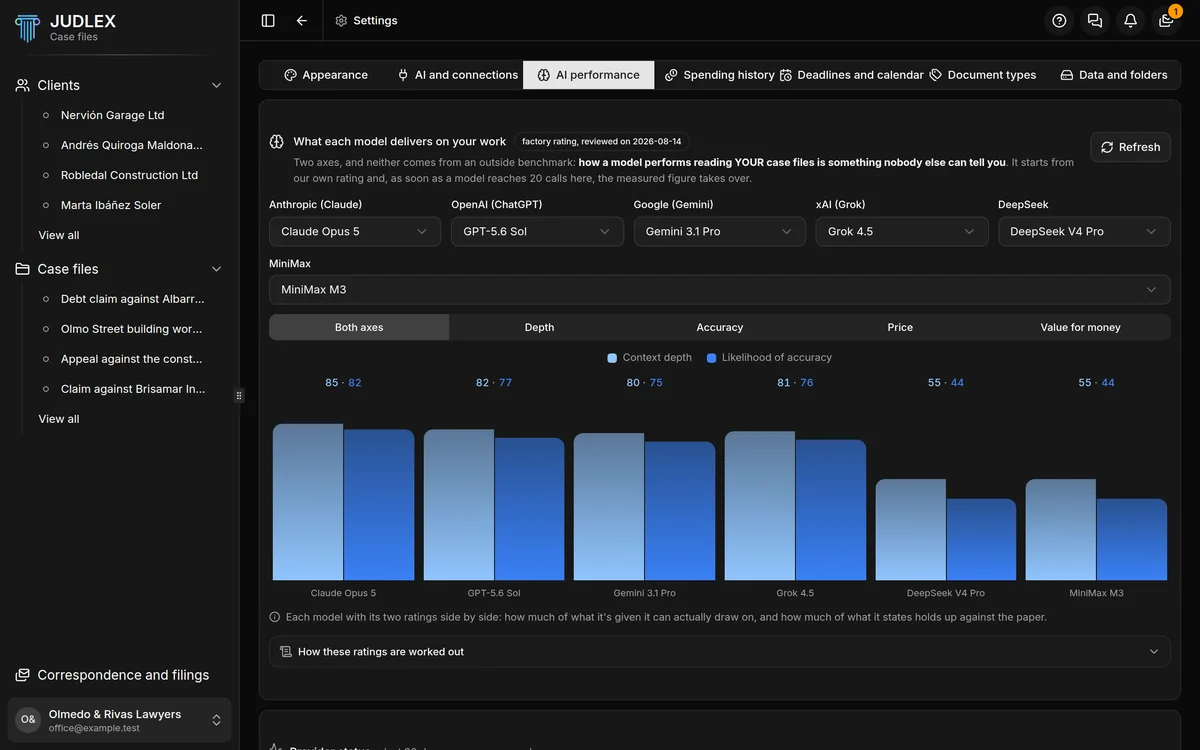
What each model delivers on your work
Each model has two ratings:
Context depth: how much of what it is given it can actually make use of.
Likelihood of accuracy: how much of what it states holds up against the document.
The starting ratings are JUDLEX’s own assessment, not a public benchmark, and the label says when they were reviewed. As soon as a model has built up twenty calls in your firm, what has been measured on your own case files takes over.
At the top you choose which model from each provider is compared. The views change what is shown:
Both axes: the two ratings together.
Depth and Accuracy: each one on its own.
Price: what each model costs.
Value for money: what each model delivers for what it costs.
How these ratings are worked out, at the bottom, explains the calculations. Refresh reads the measurements again.
If there are measurements already, Delete what's been measured and start again deletes them and goes back to the starting ratings. It happens as soon as you click, without asking.
Provider status
Below, one row per provider with one box for each of the last ninety days, based on the status page each provider publishes: green if everything worked, and another colour for days with incidents. Their status page opens that status page.
Next to it, how long the provider’s service takes to respond from your computer. That test does not use your key and costs nothing.
The same information, in small, is in the coloured bar at the foot of the consultation panel.