Settings → Spending history shows what artificial intelligence has cost since JUDLEX started keeping track. Each call to the provider is recorded on your computer with what it cost.
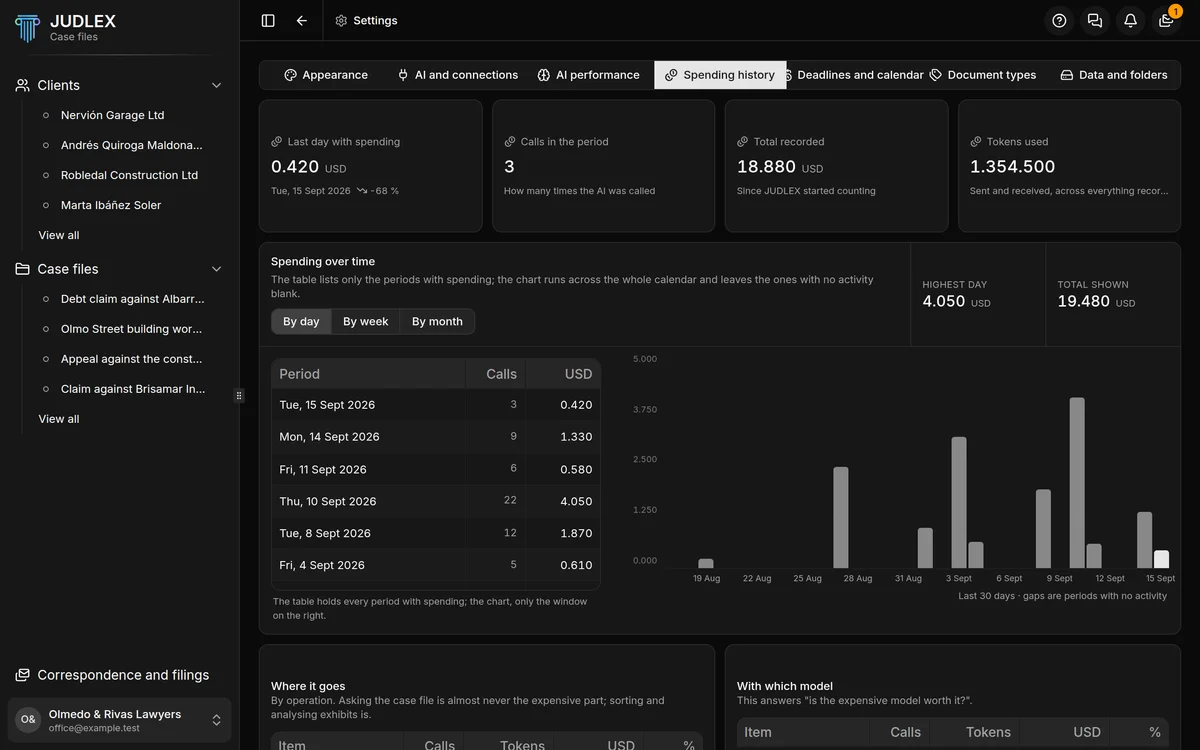
The figures at the top
Last day with spending — or week, or month — with how much it went up or down compared with the previous one.
Calls in the period: how many times artificial intelligence was called that day.
Total recorded: everything spent.
Tokens used: the units of text sent and received, which is what providers charge for.
Amounts are in dollars, because that is how providers charge.
Spending over time
By day, By week or By month. The table lists only the periods with spending; the chart covers the whole calendar and leaves blank the ones with no activity. Alongside, Highest day and Total shown.
Where it went
Three tables, each with the calls, the units of text, the amount and the percentage:
Where it goes: by operation. Splitting documents, reading scanned pages and analysing exhibits cost the most; asking the case file questions hardly ever does.
With which model: to see whether the expensive model is worth it.
Which case file it's charged to: useful if you pass the cost on to a client.
What these figures mean
Each amount is worked out on the day of the call, at the provider’s public rate at that time, with no mark-up. If the provider changes its prices, what has already been recorded does not change.
It is a guide. The bill that counts is your provider’s, since they are the ones who charge you. The JUDLEX licence does not include artificial intelligence usage.
What you have spent today also shows at the foot of the consultation panel: Panel options.