Settings → Appearance changes how JUDLEX looks on this computer. What you choose here is saved on this computer and does not affect the firm’s other computers.
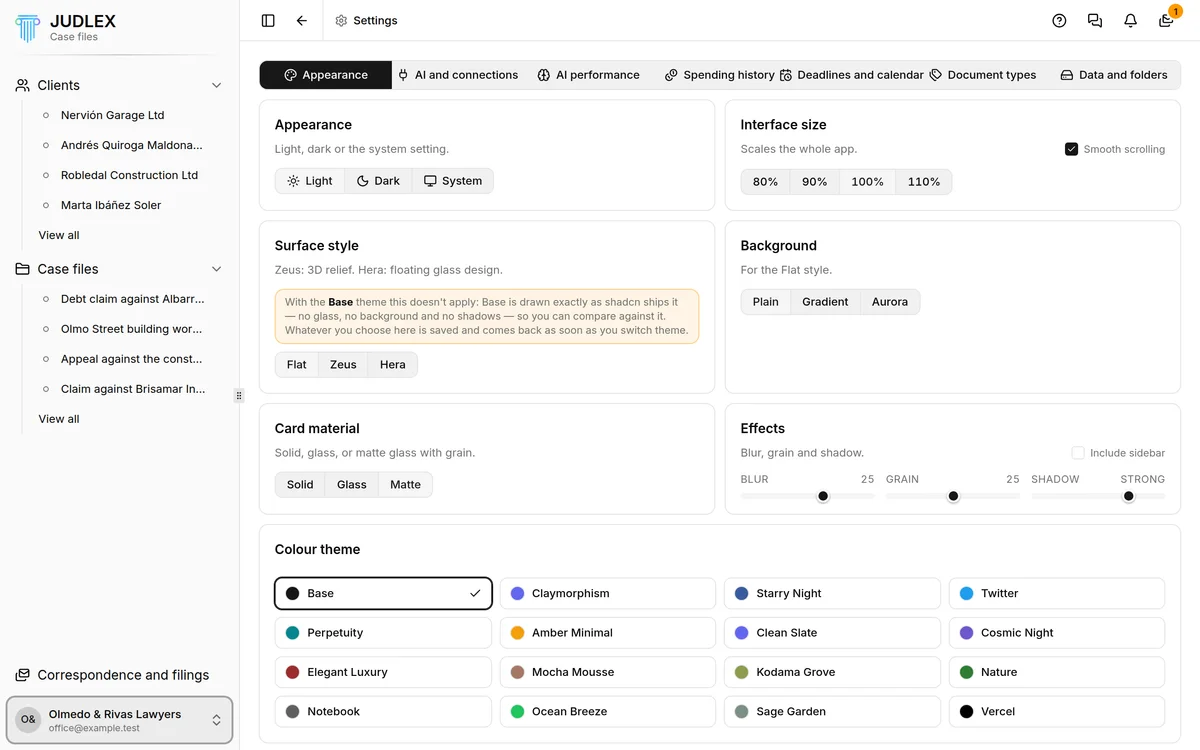
The main settings
Appearance: Light, Dark or System, which follows whatever your computer is set to. The default is System.
Interface size: makes the whole app larger or smaller, from 80% to 110%. If you find it hard to read, try 110%. Next to it, Smooth scrolling makes scrolling smoother.
Colour theme: sixteen colour combinations. Base is the default.
Fine-tuning
Surface style: Flat, Zeus, with relief, or Hera, with a glass look. With Hera, the Filigree option appears. With the Base colour theme the style does not apply, and the screen tells you so.
Background: Plain, Gradient or Aurora, for the Flat style.
Card material: Solid, Glass or Matte.
Effects: blur, grain and card shadow, with Include sidebar to apply them to the sidebar too.
Nothing on this screen needs a licence.