Settings → Document types is the list of what a document can be: court order, judgment, invoice, payslip, burofax… When JUDLEX splits and classifies the documents of a matter, artificial intelligence has to choose the type from this list. It cannot make one up, and if none fits it says so instead of choosing the closest one.
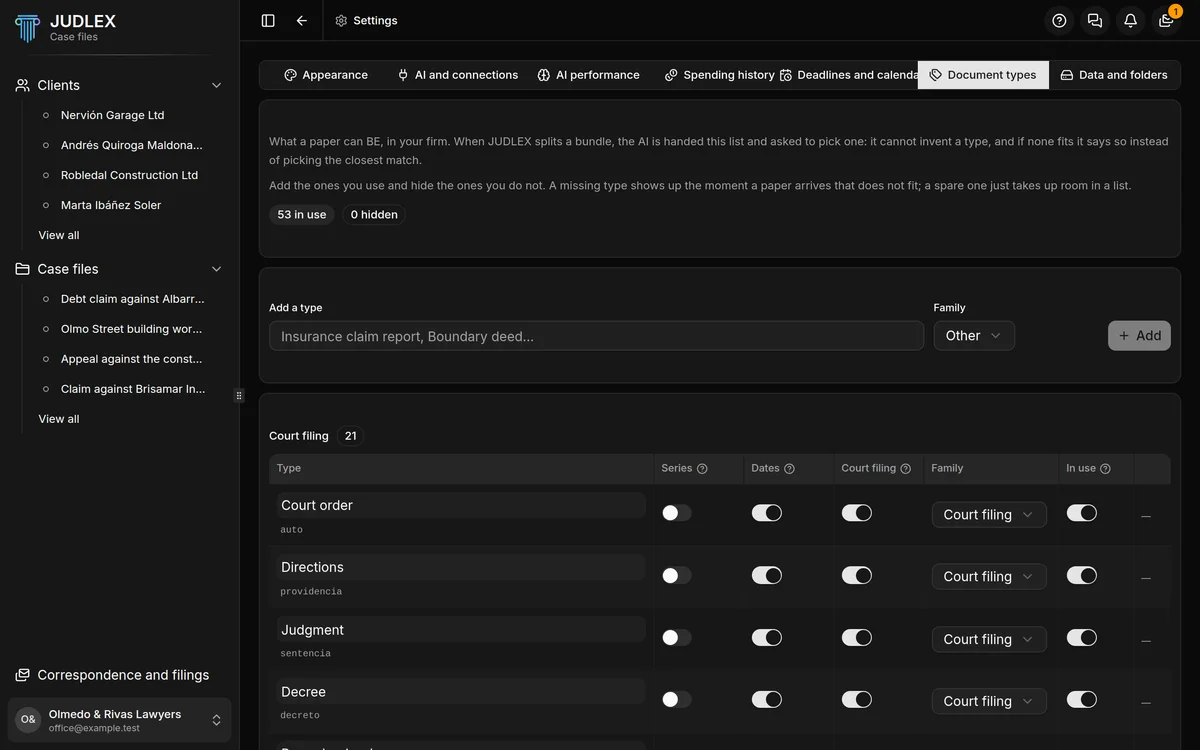
Out of the box, JUDLEX includes more than fifty types, grouped into families: court filings, billing, banking, contractual, employment, expert reports, correspondence, identity and other. Add the ones you use and hide the ones you don’t.
Adding a type
In Add a type, type the name — for example “Insurance claim report” — choose the Family and click Add.
What you can change for each type
The name: you type over it and it is saved when you leave the field. Underneath, in grey, is the key JUDLEX uses to identify it internally, which does not change.
Series: for documents that arrive in large numbers and all alike, such as invoices, payslips or statements. It decides whether a folder with too many documents is split by year.
Dates: this type yields dates that point forward — hearings, deadlines, summonses — so JUDLEX looks at it when searching for dates. Turning it on for a type that never yields dates costs money and finds nothing; turning it off for one that does can cost you a deadline.
Court filing: this type tells you who is who in the proceedings. Turning it on for an invoice can make a supplier end up listed as a party.
Family: which group it belongs to.
In use: when it is off, the type is no longer offered when classifying. Documents that already have it do not change.
Default types are hidden, not deleted. The ones you have added also have a bin icon, which only deletes the type if no document uses it; if one does, JUDLEX tells you and you can hide it instead.
What you had already classified
If you had documents classified before this list existed, Match what is already there gives them the type only when the name matches exactly. It does not guess: “Inv.” is not matched to “Invoice”. Whatever does not match appears underneath, with how many times it occurs, and from there you can use Create a type with this name.