The Classified section is the case file's table of exhibits: each real document that was inside the client's files, extracted to its own PDF, numbered and with its folios. It is what you see when you open the case file page.
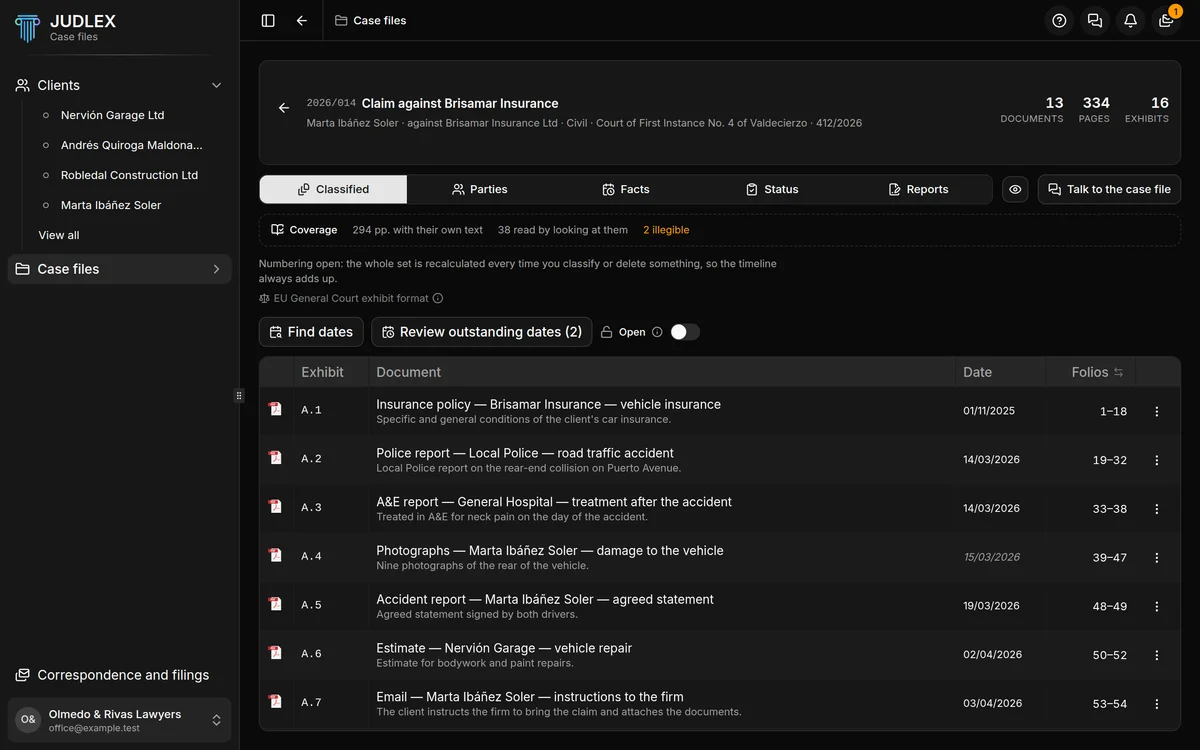
What each column shows
Exhibit: the code you cite in the pleading. Exhibits are sorted by date, from the oldest to the most recent. The label follows the format you chose in the case file details: A.7, Documento nº 7, Doc. 7 or 7.
Document: the title and, below it, a one-line summary. JUDLEX puts the title together from the type of document, who issued it and what it is about.
Date: the document's date. In italics if JUDLEX has worked it out rather than read it written on the paper. no date if there is none.
Folios: the exhibit's folio range within the case file. Clicking the column header switches it to Pages, which shows how many pages each one has, and clicking again switches back to folios.
When you hover over a code, a box shows the title, the summary, the original file it came from and which folios it is on.
Opening a document
Click an exhibit's title and it opens in a viewer inside the application. If the exhibit has its own PDF, you can select, search and zoom the text. If not, you see it page by page, with the arrow keys or the Previous page and Next page buttons.
The same viewer opens from the other sections (a party, a fact, a date) at the exact page being cited.
Correcting a date
Double-click the date, type the right one and click the tick to save it, or the cross to leave it as it was. A date entered by hand is no longer a worked-out date.
If there are still worked-out dates or exhibits with no date, JUDLEX can go over them for you: Read pages and find dates.
Two codes that read differently
A.0 comes before everything else in the case file. It is the only code that does not follow the A.1, A.2… series.
A.7.1, with one more number, is a sub-exhibit. These only appear when the numbering is protected: a new document that falls between two exhibits already cited comes in as a sub-exhibit of the earlier one, so that nothing else moves. See Open or protected numbering.
Above the table
Coverage: how many pages have been read and how. See Read pages and find dates.
Open or protected numbering, with its switch. See Open or protected numbering.
Find dates and Review outstanding dates, two readings with artificial intelligence that are paid for with your key. See Read pages and find dates.