The page opens when you click a case file in the Case files list or in the sidebar. At the top are its details and figures; below them, its sections.
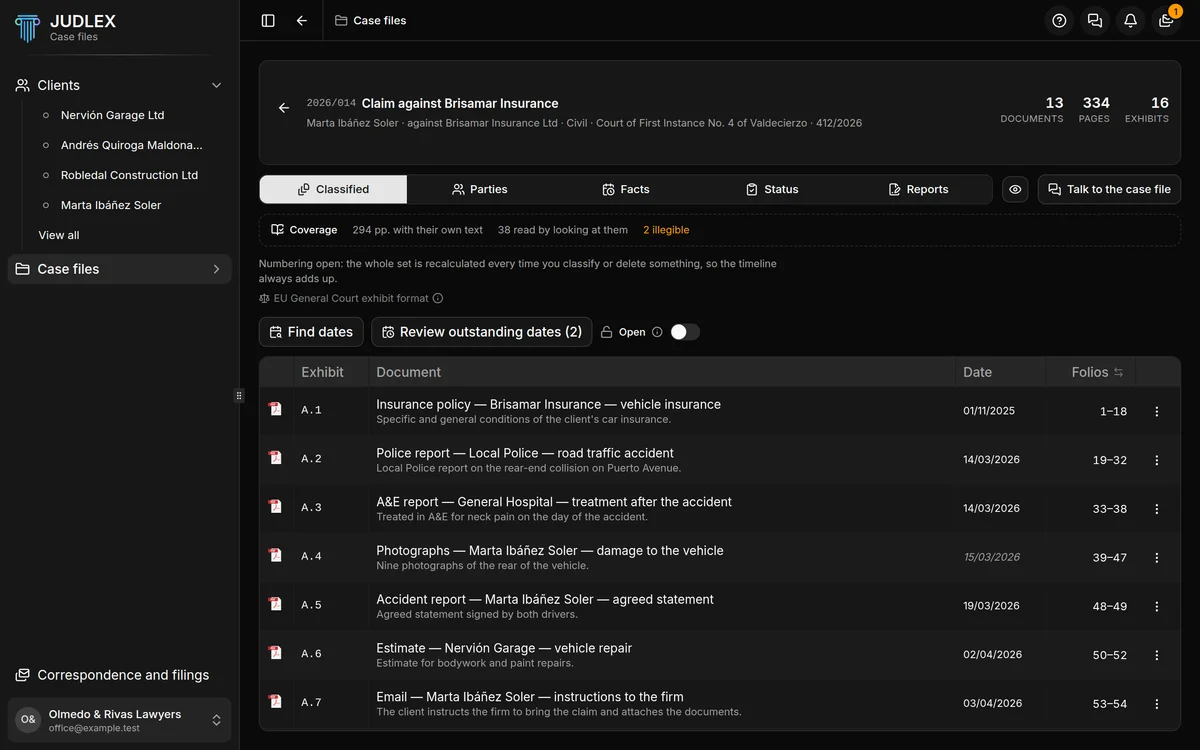
The header
The arrow on the left takes you back to the list.
The reference and the title, and the Archived label if it is archived.
Below them, the client, who the case is against, the area of law, the court and the proceedings number, depending on the details it has: Case file details.
On the right, three figures for the paperwork it is built on: Documents, Pages and Exhibits.
The sections
Classified: the exhibits. Each real document, extracted to its own PDF, numbered and with its folios. See Exhibits.
Parties: who is who in the proceedings, with their role and the folio where they appear. See Parties.
Facts: what has happened and when, each fact with the sentence from the document it comes from. See Facts.
Status: what is still to be decided, what does not add up and the case file's dates. See Case file status.
Parties comes before Facts on purpose: once you know who is suing, who is defending and which court has the case, the facts make more sense.
When you hover over each tab, a box explains what is inside.
The buttons on the right
The eye masks the names so you can show the screen without them being read, just as in the lists.
Talk to the case file opens the consultation panel on the right of the window, without taking room from the documents. You ask it in plain language and each answer comes with its exhibit, its page and the exact sentence it comes from. See The consultation panel.
Dragging files onto the page
You can drag files from your desktop onto the page. They do not come in as exhibits of this case file: they go into the client's matter, unfiled, because the paperwork lives in the matter. JUDLEX tells you when it has finished. From the matter they are read, split and classified like any other paper: Add papers to a matter.
If the case file has no exhibits
The Classified section says so and offers Go to the matter, which opens the client's record so you can work on their paperwork.