The Parties section of the case file page brings together the people and organisations involved in the proceedings: the other side, the court, the lawyers and court agents, the experts, the witnesses. For each one it shows their role, their NIF if it is recorded, and the folio where they appear.
What JUDLEX suggests comes in as proposed. Nothing counts as confirmed until you accept it.
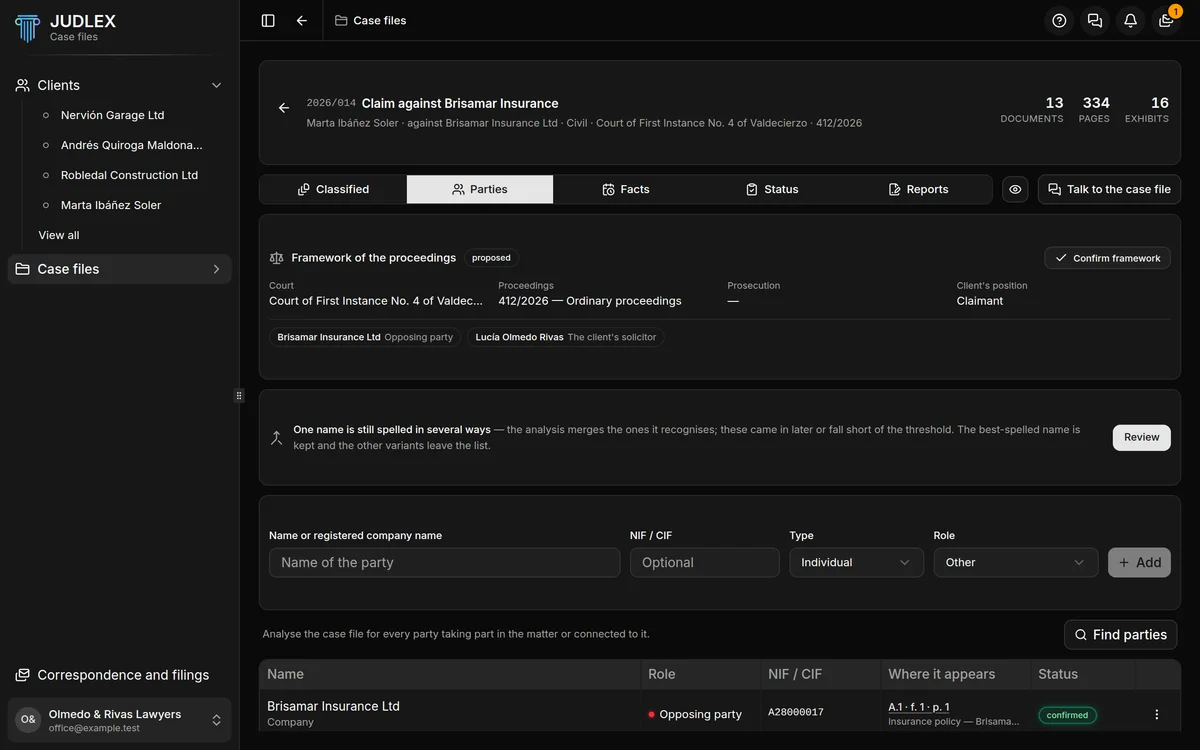
The framework of the proceedings
At the top, the Framework of the proceedings card sums up the Court, the Proceedings, the Prosecution, if there is one, and the Client's position. A dash means it is not recorded. If the framework is proposed, Confirm framework accepts it.
Below it are the people involved according to the framework. Click one to open the exhibit at the page where they appear.
Finding the parties
Find parties asks the artificial intelligence to read the case file looking for all the parties who take part in the matter or are mentioned in it. It is paid for with your firm's key; when it finishes, a message tells you what it cost.
Parties also appear when you analyse the exhibits from the Facts section: Facts.
The list
Name, and below it whether it is an individual or a company.
Role: opposing party, court, expert, witness, the client's solicitor, opposing court agent… The coloured dot shows which side they are on. When you hover over it, it explains the role.
NIF / CIF, if recorded.
Where it appears: the exhibit, the folio and the page where they appear. Click it to open the exhibit at that page. The folio is calculated, not read from the paper.
Status: proposed, confirmed or, in amber, unresolved, when JUDLEX could not pin down the name properly. Clicking unresolved opens the correction.
The actions for each party
In the three-dot menu on the row:
Correct name: changes the name here and everywhere in the case file that uses it (exhibit titles, facts, dates, the framework), except in verbatim quotations, which are what the paper says.
Confirm, or Undo to set it back to proposed.
Delete: removes it from the case file. It no longer counts towards the conflict of interest warning. You are asked to confirm first.
Names written more than one way
If the same person is written in several ways (“Joaquín Ferrer Lago” in the police report and “J. Ferrer” in the joint accident report), the warning One name is still spelled in several ways appears with the Review button. In the dialog, Merge the name keeps the best-written form and removes the others from the list; Keep only this one keeps the one you choose; Not now leaves it for later.
Adding a party by hand
Above the list there is a form: Name or registered company name, NIF / CIF (optional), Type (individual or company) and Role. Click Add. When you leave the NIF field, JUDLEX checks it against your clients and against the parties in the other case files, and warns you if there is a possible conflict of interest: Conflict of interest warning.
The Client role cannot be chosen: who the client is comes from the case file page, not from the list of parties.
Adding parties and finding them requires an active licence.