A file someone sends you is hardly ever a single paper. An eight-hundred-page PDF can contain a statement of claim, forty invoices, three reports and a judgment. Read it and split out its documents makes JUDLEX read the whole file and divide it into each of those papers, each in its own PDF.
What it does
It reads every page. If the PDF carries its own text, it uses it as it is. If a page is scanned, the artificial intelligence reads it by looking at it, as a person would.
It separates the papers. It decides where one document ends and the next begins. Each split has to rest on a sentence that appears on the page; if there is none, the split is discarded.
It gives each paper its details. The date, the type of document and who signed it, when that is on record. From these it builds the paper's name: date, type, issuer and subject, in that order, so that outside JUDLEX they also sort by date.
What is not on record is not filled in. A date that is inferred rather than read is marked as inferred. Who signed a paper is never inferred: either it appears on the page or it is left blank. A page that cannot be read is declared illegible, not made up.
How to start it
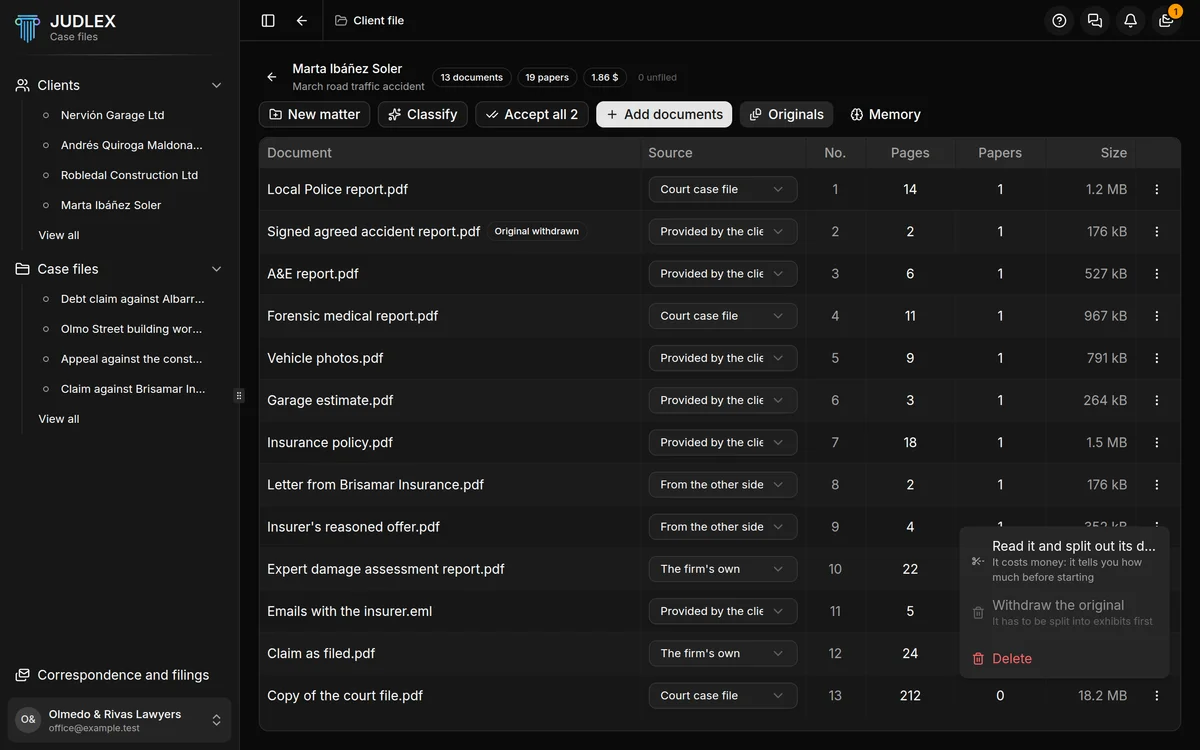
Open the matter s originals
In the client file, with the matter open, click Originals. You will see the list of files exactly as they came in, with their pages and the papers taken out of each one.
Open the document s menu
Click the three dots at the end of the file's row, or right-click the row.
Click Read it and split out its documents
JUDLEX first works out what it will cost and shows it to you at the top, next to the progress: how many pages and roughly how many dollars.
While it works, the status line tells you how far it has got: which page it is reading, how many scanned pages are left to look at and which batch of the splitting it is on.
What you see when it finishes
A message sums up what has happened:
How many documents have been split out of the dump.
How many have their date read from the paper itself.
How many splits were discarded because the sentence that justified them was not on record.
How many names of people or organisations it noted along the way.
The actual cost, in dollars, of what your provider has charged.
If any page could not be read, a separate message tells you how many: they are declared illegible.
The new papers appear in the tree, under Unfiled, until you click Classify: Classify and identify.
What it costs
This does cost money, because the artificial intelligence reads the whole file. It is paid for with your key, at your provider's price. What makes reading most expensive is scanned pages, because each one is looked at as an image. A PDF with clean text comes out much cheaper.
The figure shown next to the matter's name, at the top of the client file, adds up everything it has cost to sort out that paperwork.
Where the document comes from
In the list of originals, the Source column lets you mark where each file comes from: Court case file, Provided by the client, From the other side or The firm's own. You choose it in the row's drop-down.