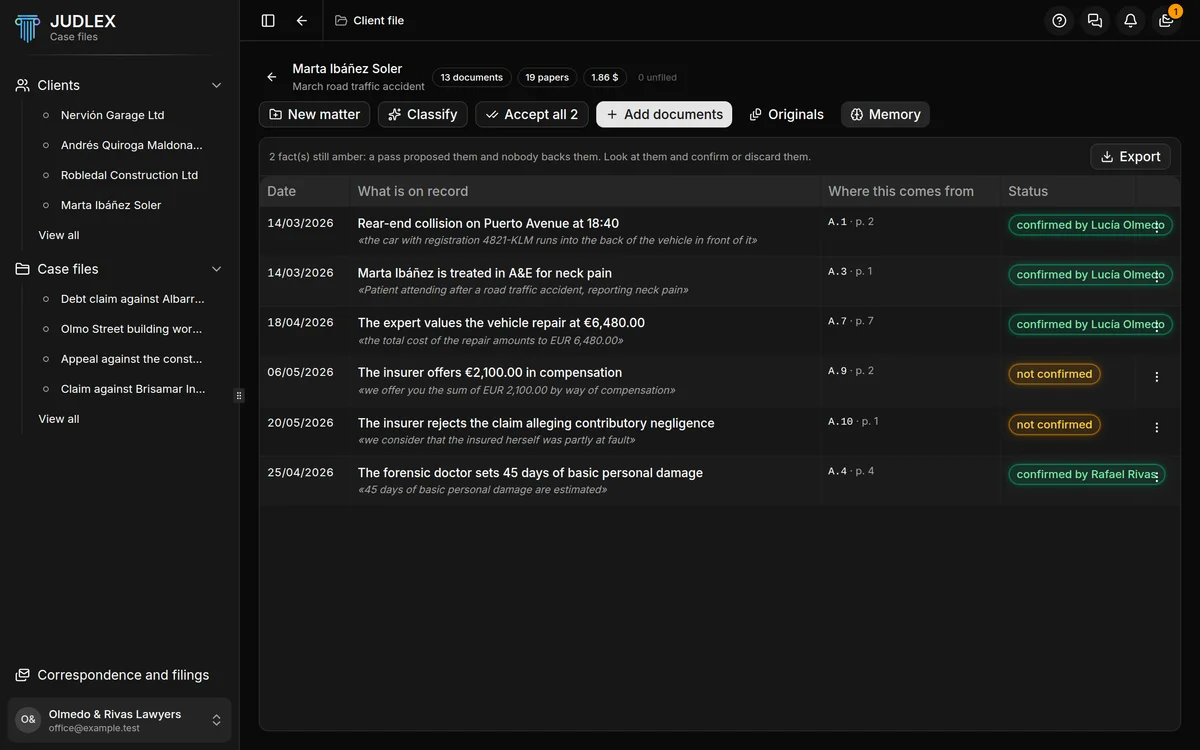
The memory is the list of everything JUDLEX knows about a matter. Each fact appears only once, with the paper it comes from, its page and the literal sentence behind it. What you have confirmed is what the application states; what is still in amber was proposed by a reading and nobody has reviewed it yet.
You open it with the Memory button, in the client file's row of buttons, with the matter expanded.
How it fills up
By itself. Every time JUDLEX reads one of the matter's papers, whatever it takes from it lands here with its citation, waiting for you to review it. A newly created matter has no memory yet.
What each row says
DateThe date of the fact, if it is on record. If not, it says "no date".
What is on recordThe fact, told in one sentence.
Where this comes fromThe paper and the page it was taken from.
StatusConfirmed, with the name of whoever confirmed it; not confirmed, in amber; or discarded.
At the top, a message tells you how many facts are still in amber.
Reviewing a fact
Click the row, or See the whole fact in its menu, to open the full fact. You will see The wording it comes from, exactly as it is in the paper, and three buttons:
I confirm it: the fact turns green and JUDLEX will treat it as correct from then on.
Discard: the fact is no longer stated, but it does not disappear. It is still shown as discarded, with its reason.
Leave as proposed: sends it back to amber if you had confirmed or discarded it.
Discarded facts are kept on purpose. If a matter has already been filed, you need to be able to say what the case file said before a correction and why it changed. If a fact corrects another, it says so: "It replaces fact" followed by the earlier one.
The legal qualification
As well as the fact, you can note how the firm qualifies it: Qualify, in the fact's menu, or Change the qualification if it already has one.
The qualification is kept separate from the fact, and that is deliberate. The fact is what the paper says; the qualification is what the firm thinks today. It is a provisional assessment: it does not change the fact or the sentence in the document, and you can change or withdraw it whenever you like.
Exporting
Export saves the whole memory to a file on your computer, and tells you where it has written it.