Originals is the matter's intake receipt: the list of files exactly as they came in, before they were split into papers. You look at it to check what has come in and to start splitting a file; day-to-day work is done in the tree.
You open it with the Originals button, in the client file's row of buttons, with the matter expanded.
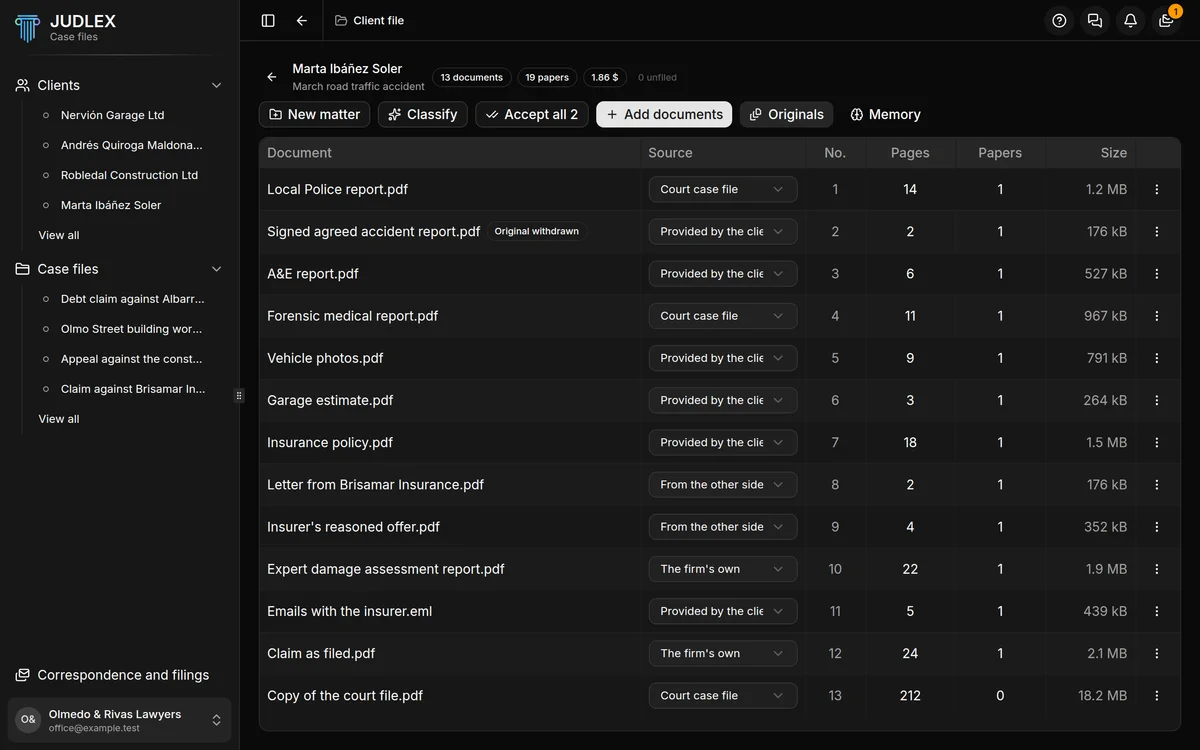
What each row says
DocumentThe name of the file exactly as it came in.
SourceWhere it comes from: Court case file, Provided by the client, From the other side or The firm's own. You choose it in the drop-down.
No.Its intake number at the firm.
PagesHow many pages it has.
PapersHow many real documents have been taken out of it when it was split.
SizeHow much space it takes up.
JUDLEX also keeps each file's fingerprint, which is what lets it recognise the file if it comes in again, even under another name.
Each file's menu
Read it and split out its documents: splits it into the papers it contains. It costs money and tells you how much before it starts. See Read a file and split out its documents.
Withdraw the original: deletes the intake file from the vault, but keeps the whole row with its name, fingerprint and intake number, and all the papers already taken out of it.
Delete: deletes the file and its row.
Withdrawing an original
This is for freeing up space when a huge dump has already been split into its papers and the intake file adds nothing more.
You can only withdraw a file that has already been split into its papers. When you withdraw it, JUDLEX asks for your full name, which is recorded together with the date: that way it is known who withdrew it and when. In the list, the row is marked as Original withdrawn.
Deleting a document
Delete deletes the file from the vault and its row. If papers have already been taken out of it, JUDLEX will not let you delete it: those papers are removed from their case file, where you can see what each deletion takes with it.